Count Objects Crossing a Line
Pipeline source: examples/run_count_objects_crossing_line.py
Count vehicles as they cross a horizontal line. The pipeline adds one concern at a time: detection, visualization, line configuration, tracking, crossing state, then video output.
Install dependencies
Download the source video
Use Supervision's vehicles asset as the input video. The line coordinates below are defined for its original 3840 x 2160 resolution.
import supervision as sv
from supervision.assets import VideoAssets, download_assets

source_path = download_assets(VideoAssets.VEHICLES)
video_info = sv.VideoInfo.from_video_path(source_path)
Run object detection
Run the model and convert its first response to sv.Detections. The resulting detections become the input to the later pipeline stages.
from ml_pipes.core import Pipeline
from ml_pipes.standard import Select
from ml_pipes.supervision import Detections
from ml_pipes.supervision.inference import RoboflowInference

model_id = "yolo11x-640"

detection_pipeline = Pipeline(
    [
        RoboflowInference(model_id=model_id),
        Select(0),
        Detections.FromInference(),
    ],
    auto_validate=True,
)
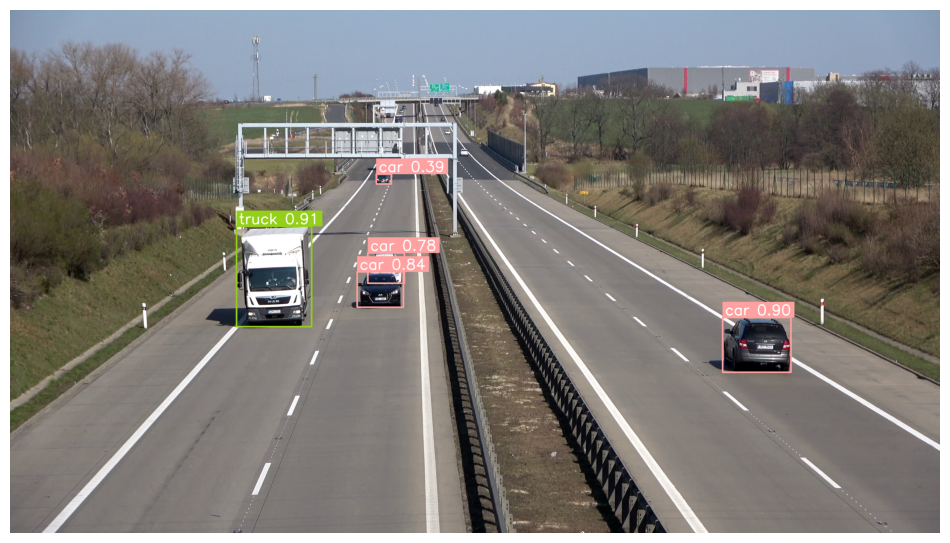
Visualizing Detection
Detections do not contain the source image. Store and recall the frame when drawing its boxes and labels.
from ml_pipes.standard import Pick, Recall, Store
from ml_pipes.supervision import BoxAnnotator, LabelAnnotator

visualization_pipeline = Pipeline(
    [
        Store("source_frame"),
        RoboflowInference(model_id=model_id),
        Select(0),
        Detections.FromInference(),
        Recall("source_frame", prepend=True),
        BoxAnnotator(thickness=6),
        LabelAnnotator(text_thickness=4, text_scale=2, show_class=True, show_confidence=True),
        Pick(0),
    ],
    auto_validate=True,
)
Define the line position
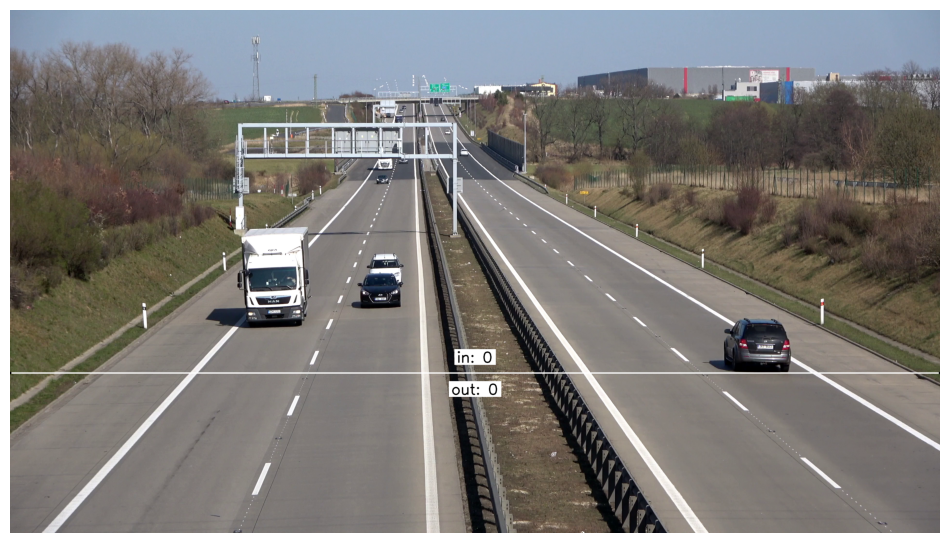
LineZone holds the crossing state. Configure its endpoints in source-video coordinates and add its annotator directly to the visualization pipeline.
from ml_pipes.supervision import LineZoneAnnotator

line_start = sv.Point(0, 1500)
line_end = sv.Point(3840, 1500)
line_zone = sv.LineZone(start=line_start, end=line_end)

line_pipeline = Pipeline(
    [
        Store("source_frame"),
        RoboflowInference(model_id=model_id),
        Select(0),
        Detections.FromInference(),
        Recall("source_frame", prepend=True),
        BoxAnnotator(thickness=6),
        LabelAnnotator(text_thickness=4, text_scale=2, show_class=True, show_confidence=True),
        LineZoneAnnotator(line_zone=line_zone, thickness=4, text_thickness=4, text_scale=2),
        Pick(0),
    ],
    auto_validate=True,
)
Track objects crossing
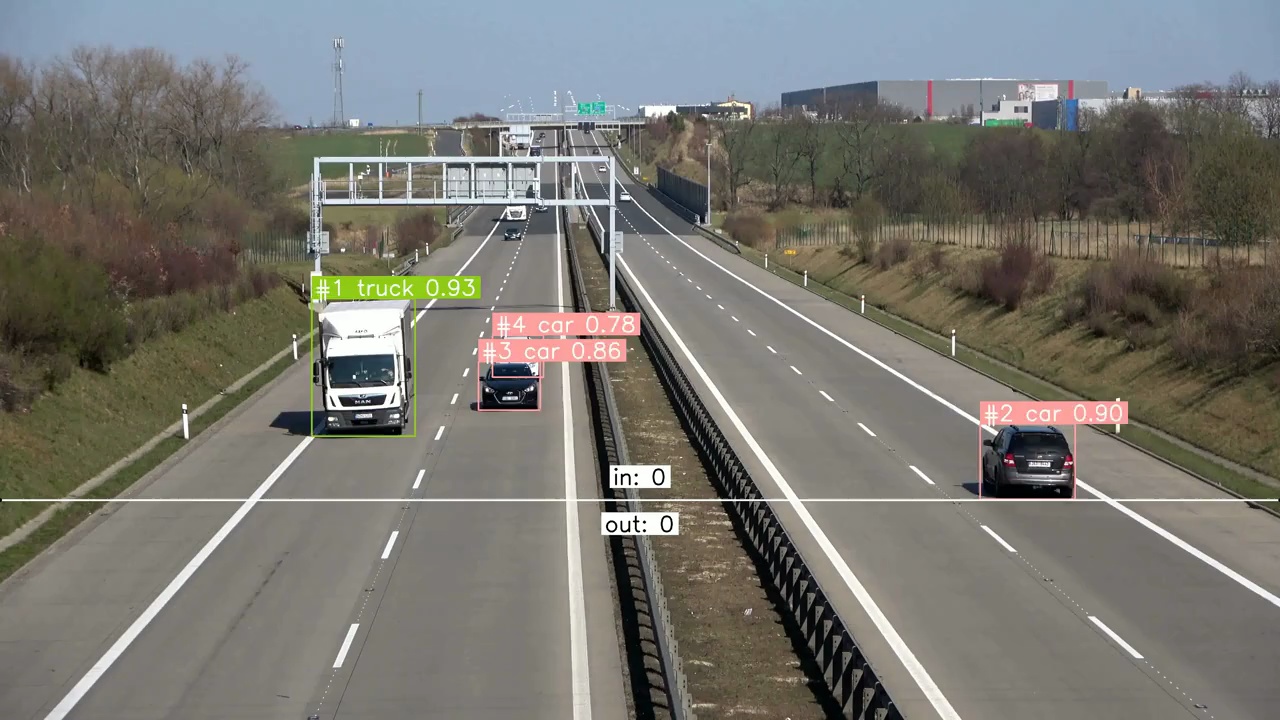
Counting requires stable object identities. Add ByteTrack, trigger the line zone with tracked detections, draw each object's path, and show its tracker ID in the label.
from ml_pipes.supervision import TraceAnnotator, TriggerLineZone
from ml_pipes.supervision.trackers import ByteTrack

frame_pipeline = Pipeline(
    [
        Store("source_frame"),
        RoboflowInference(model_id=model_id),
        Select(0),
        Detections.FromInference(),
        ByteTrack(),
        TriggerLineZone(line_zone),
        Recall("source_frame", prepend=True),
        TraceAnnotator(thickness=4),
        BoxAnnotator(thickness=4),
        LabelAnnotator(
            text_thickness=4,
            text_scale=2,
            show_tracker_id=True,
            show_class=True,
            show_confidence=True,
        ),
        LineZoneAnnotator(line_zone=line_zone, thickness=4, text_thickness=4, text_scale=2),
        Pick(0),
    ],
    auto_validate=True,
)
Process Video
Pass the completed frame pipeline to sv.process_video to write the annotated result.
sv.process_video(
    source_path=source_path,
    target_path="count-objects-crossing-the-line-result.mp4",
    callback=lambda frame, _: frame_pipeline(frame),
)
Inspect the Pipeline
Use Pipeline.inspect() to capture the value at every operator boundary
without changing the pipeline's final output. The inspection renderer turns
that captured run into a shareable HTML report.
from ml_pipes.inspection import PipelineInspector

inspection = frame_pipeline.inspect(representative_frame)
PipelineInspector().save(inspection, "inspection.html")
The report below captures the complete line-crossing pipeline on a frame from the source video.

Click the image to open the interactive inspection report.