Detect and Annotate
Supervision provides a seamless process for annotating predictions generated by various object detection and segmentation models. This guide shows how to perform inference with the Inference, Ultralytics or Transformers packages. Following this, you'll learn how to import these predictions into Supervision and use them to annotate source image.
Run Detection
First, you'll need to obtain predictions from your object detection or segmentation model.
To run inference, initialize a Roboflow Inference model and pass the source
image to its infer method. The result is an Inference response object that
you will convert to a Detections instance in the next step. The ml-pipes
pipeline below performs the same operation as a composable pipeline boundary.
from ml_pipes.core import Pipeline
from ml_pipes.supervision import ImageToArray
from ml_pipes.supervision.inference import RoboflowInference
from ml_pipes.vision import Decode, LoadFile

pipeline = Pipeline(
    [
        LoadFile(),
        Decode(),
        ImageToArray(),
        RoboflowInference(model_id="yolov8n-640"),
    ]
)

results = pipeline("people-walking.jpg")
Load Predictions into Supervision
Now that we have predictions from a model, we can load them into Supervision.
Supervision provides sv.Detections.from_inference to convert a raw Inference
response into a unified Detections object. The ml-pipes equivalent keeps
that conversion as an explicit pipeline boundary.
from ml_pipes.core import Pipeline
from ml_pipes.standard import Select
from ml_pipes.supervision import Detections, ImageToArray
from ml_pipes.supervision.inference import RoboflowInference
from ml_pipes.vision import Decode, LoadFile

pipeline = Pipeline(
    [
        LoadFile(),
        Decode(),
        ImageToArray(),
        RoboflowInference(model_id="yolov8n-640"),
        Select(0),
        Detections.FromInference(),
    ]
)

detections = pipeline("people-walking.jpg")
Use the sv.Detections.from_inference method, which accepts model results from both detection and segmentation models.
You can load predictions from other computer vision frameworks and libraries using:
from_deepsparse(Deepsparse)from_detectron2(Detectron2)from_mmdetection(MMDetection)from_sam(Segment Anything Model)from_yolo_nas(YOLO-NAS)
Annotate Image with Detections
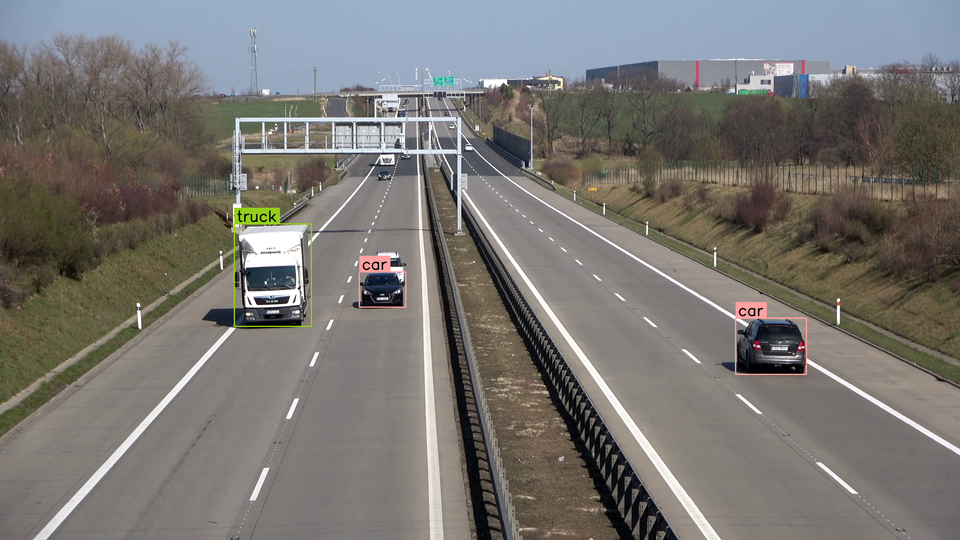
Finally, we can annotate the image with the predictions. Since we are working with an object detection model, we will use the sv.BoxAnnotator and sv.LabelAnnotator classes.
To draw bounding boxes and class labels on your image, create a BoxAnnotator and a LabelAnnotator, then call their annotate methods in sequence. Each annotator returns the modified image, so you can chain multiple annotators together. The result is a single NumPy array with all visual overlays rendered and ready for display or saving.
from ml_pipes.core import Pipeline
from ml_pipes.standard import Recall, Select, Store
from ml_pipes.supervision import BoxAnnotator, Detections, ImageToArray, LabelAnnotator
from ml_pipes.supervision.inference import RoboflowInference
from ml_pipes.vision import Decode, LoadFile
pipeline = Pipeline(
[
LoadFile(),
Decode(),
ImageToArray(),
Store("source_image"),
RoboflowInference(model_id="yolov8n-640"),
Select(0),
Detections.FromInference(),
Recall("source_image", prepend=True),
BoxAnnotator(),
LabelAnnotator(),
]
)
annotated_image, detections = pipeline("people-walking.jpg")
import cv2
import supervision as sv
from inference import get_model

model = get_model(model_id="yolov8n-640")
image = cv2.imread("people-walking.jpg")
results = model.infer(image)[0]
detections = sv.Detections.from_inference(results)
box_annotator = sv.BoxAnnotator()
label_annotator = sv.LabelAnnotator()
annotated_image = box_annotator.annotate(
scene=image, detections=detections)
annotated_image = label_annotator.annotate(
scene=annotated_image, detections=detections)
Display Custom Labels
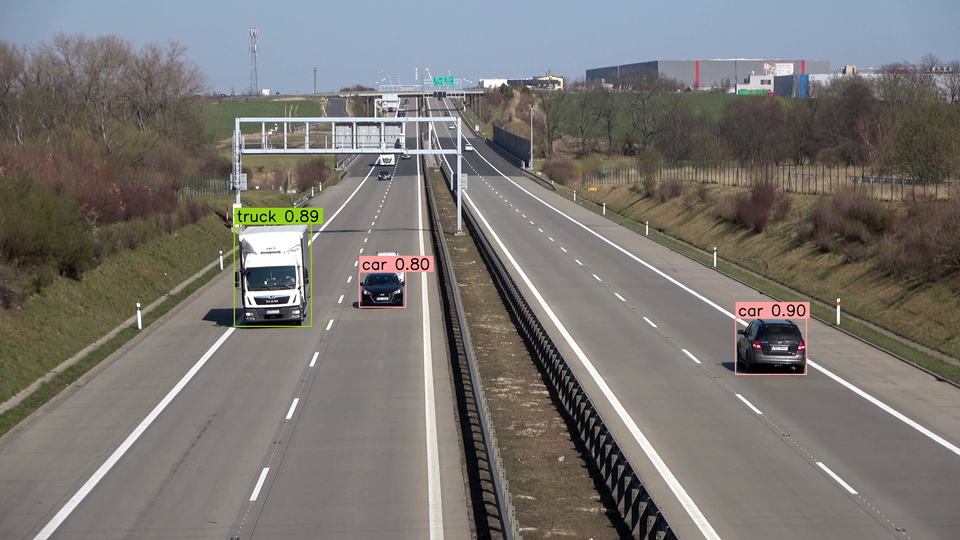
By default, sv.LabelAnnotator will label each detection with its class_name (if possible) or class_id. You can override this behavior by passing a list of custom labels to the annotate method. ml-pipes configures the supported label fields directly on LabelAnnotator.
from ml_pipes.core import Pipeline
from ml_pipes.standard import Recall, Select, Store
from ml_pipes.supervision import BoxAnnotator, Detections, ImageToArray, LabelAnnotator
from ml_pipes.supervision.inference import RoboflowInference
from ml_pipes.vision import Decode, LoadFile

pipeline = Pipeline(
    [
        LoadFile(),
        Decode(),
        ImageToArray(),
        Store("source_image"),
        RoboflowInference(model_id="yolov8n-640"),
        Select(0),
        Detections.FromInference(),
        Recall("source_image", prepend=True),
        BoxAnnotator(),
        LabelAnnotator(show_class=True, show_confidence=True),
    ]
)

annotated_image, detections = pipeline("people-walking.jpg")
import cv2
import supervision as sv
from inference import get_model

model = get_model(model_id="yolov8n-640")
image = cv2.imread("people-walking.jpg")
results = model.infer(image)[0]
detections = sv.Detections.from_inference(results)

box_annotator = sv.BoxAnnotator()
label_annotator = sv.LabelAnnotator()

labels = [
    f"{class_name} {confidence:.2f}"
    for class_name, confidence
    in zip(detections['class_name'], detections.confidence)
]

annotated_image = box_annotator.annotate(
    scene=image, detections=detections)
annotated_image = label_annotator.annotate(
    scene=annotated_image, detections=detections, labels=labels)
Annotate Image with Segmentations
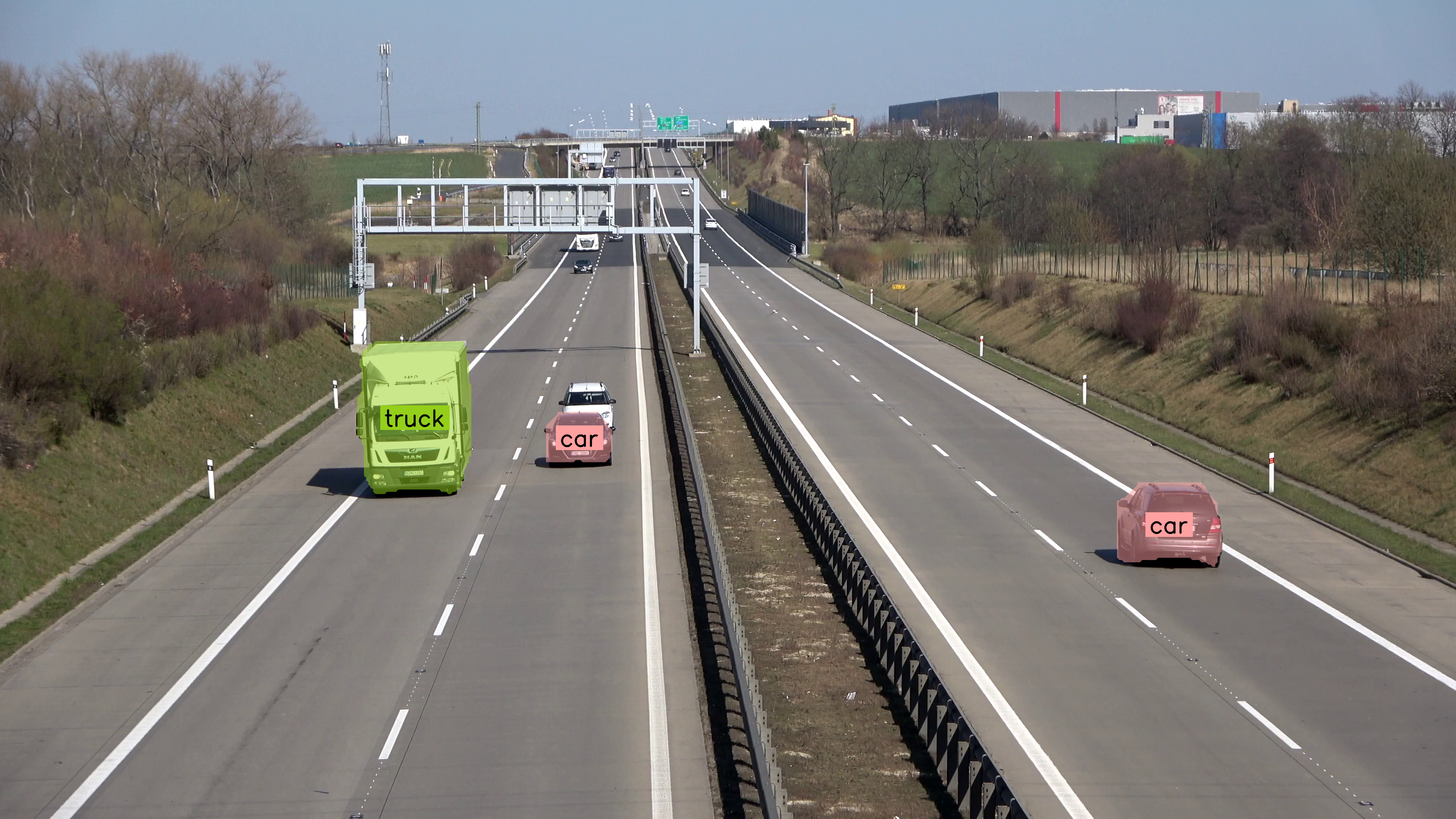
If you are running the segmentation model sv.MaskAnnotator is a drop-in replacement for sv.BoxAnnotator that will allow you to draw masks instead of boxes.
import supervision as sv

from ml_pipes.core import Pipeline
from ml_pipes.standard import Recall, Select, Store
from ml_pipes.supervision import Detections, ImageToArray, LabelAnnotator, MaskAnnotator, PlotImage
from ml_pipes.supervision.inference import RoboflowInference
from ml_pipes.vision import Decode, LoadFile

pipeline = Pipeline(
    [
        LoadFile(),
        Decode(),
        ImageToArray(),
        Store("source_image"),
        RoboflowInference(model_id="yolov8n-seg-640"),
        Select(0),
        Detections.FromInference(),
        Recall("source_image", prepend=True),
        MaskAnnotator(),
        LabelAnnotator(text_position=sv.Position.CENTER_OF_MASS),
        PlotImage(at=0),
    ]
)

annotated_image, detections = pipeline("people-walking.jpg")
import cv2
import supervision as sv
from inference import get_model

model = get_model(model_id="yolov8n-seg-640")
image = cv2.imread("people-walking.jpg")
results = model.infer(image)[0]
detections = sv.Detections.from_inference(results)

mask_annotator = sv.MaskAnnotator()
label_annotator = sv.LabelAnnotator(text_position=sv.Position.CENTER_OF_MASS)

annotated_image = mask_annotator.annotate(
    scene=image,
    detections=detections,
)
annotated_image = label_annotator.annotate(
    scene=annotated_image,
    detections=detections,
)
sv.plot_image(annotated_image)
Inspect the Pipeline
Use Pipeline.inspect() to capture the value at every operator boundary
without changing the pipeline's final output. The inspection renderer turns
that captured run into a shareable HTML report.
from ml_pipes.inspection import PipelineInspector

inspection = pipeline.inspect("vehicles_frame.jpg")
PipelineInspector().save(inspection, "inspection.html")
The report below captures the Detect and Annotate pipeline on a frame from the vehicle video used in the line-crossing example.
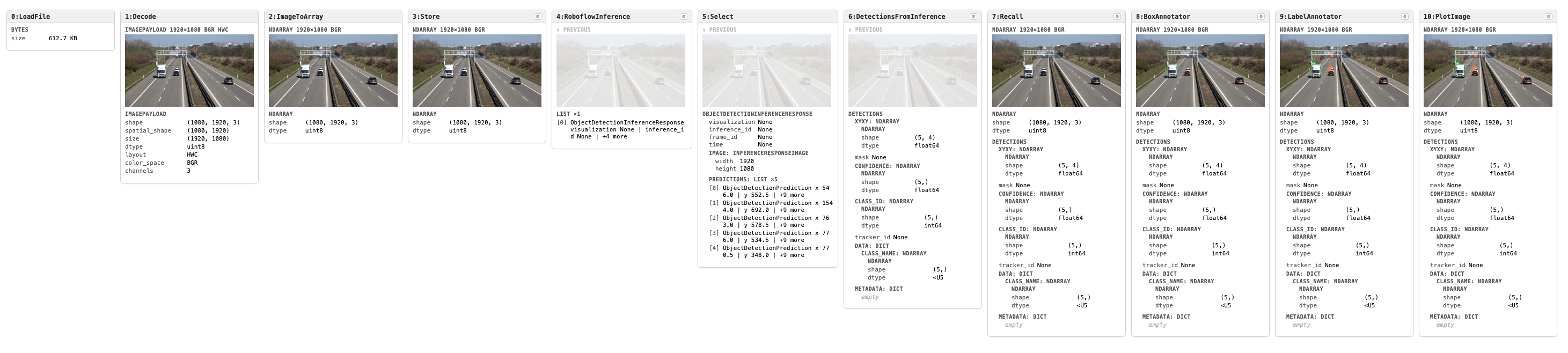
Click the image to open the interactive inspection report.
Frequently Asked Questions
How do I detect and annotate objects with supervision?
Pass any model's output to sv.Detections.from_<model>() to create a unified Detections object. Then pass it to sv.BoxAnnotator or sv.MaskAnnotator to draw predictions on an image.
Can I annotate both bounding boxes and masks at the same time?
Yes. Chain annotators: first draw boxes with BoxAnnotator, then overlay masks with MaskAnnotator on the same scene.
How do I label detections with class names?
Use sv.LabelAnnotator and pass custom text with the labels parameter. If a connector provides class names, they are stored in detections["class_name"] / detections.data["class_name"]; when labels is omitted, LabelAnnotator uses class names first, then class IDs, then detection indices.
Can I use supervision with Hugging Face models?
Yes. sv.Detections.from_transformers() accepts supported Hugging Face object detection and segmentation outputs. Vision-language model outputs are handled through sv.Detections.from_vlm(...), for example with sv.VLM.FLORENCE_2 or sv.VLM.PALIGEMMA.
Authors
- Piotr Skalski — Computer Vision Engineer, Roboflow
- Borda — Open Source Engineer, Roboflow