Zero-Shot Object Detection with YOLO-World
Pipeline source: examples/run_zero_shot_object_detection.py
YOLO-World is a zero-shot detector: instead of being limited to a fixed training label set, it accepts the classes to find at runtime. It retains YOLO's fast CNN-based architecture while allowing prompts such as yellow filling to define the task.
This recipe builds the video pipeline in meaningful boundaries: prompt the model, annotate its detections, remove overly large detections, and process the video.
Install dependencies
Start with the source video
Read the video metadata to establish the image shape needed by the area filter.
import supervision as sv

source_path = "yellow-filling.mp4"
video_info = sv.VideoInfo.from_video_path(source_path)
frame_shape = video_info.resolution_wh[::-1]
Run the prompted model
YOLO-World accepts the classes to find at runtime. Provide the yellow filling prompt, convert the result to Supervision detections, and remove duplicate boxes.
from inference.models.yolo_world.yolo_world import YOLOWorld
from ml_pipes.core import Pipeline
from ml_pipes.supervision import Detections
from ml_pipes.supervision.inference import RoboflowInference

model = YOLOWorld(model_id="yolo_world/l")

inference_pipeline = Pipeline(
    [
        RoboflowInference(model, text=["yellow filling"], confidence=0.002),
        Detections.FromInference(),
        Detections.NMS(threshold=0.1),
    ],
    auto_validate=True,
)
Visualizing Detection
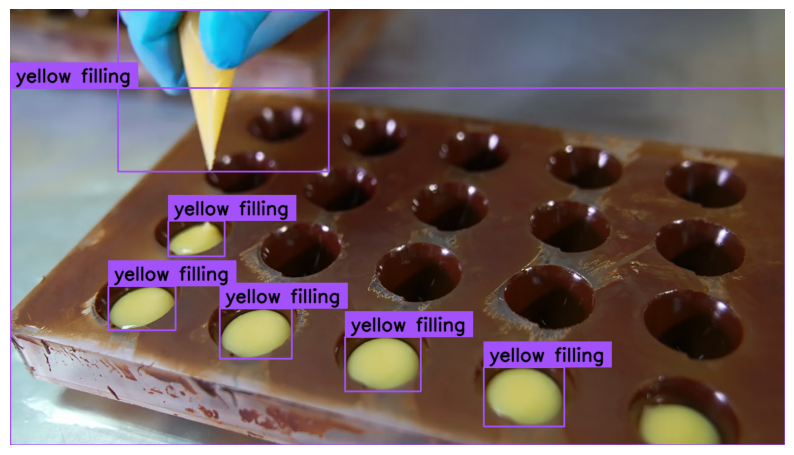
Inference produces detections, not an image. Store the source frame before inference and recall it only when annotation needs the (scene, detections) tuple. The model and NMS flow remains unchanged.
from ml_pipes.standard import Pick, Recall, Store
from ml_pipes.supervision import BoxAnnotator, LabelAnnotator

annotation_pipeline = Pipeline(
    [
        Store("source_frame"),
        RoboflowInference(model, text=["yellow filling"], confidence=0.002),
        Detections.FromInference(),
        Detections.NMS(threshold=0.1),
        Recall("source_frame", prepend=True),
        BoxAnnotator(thickness=2),
        LabelAnnotator(show_class=True, show_confidence=True),
        Pick(0),
    ],
    auto_validate=True,
)
Filter detections
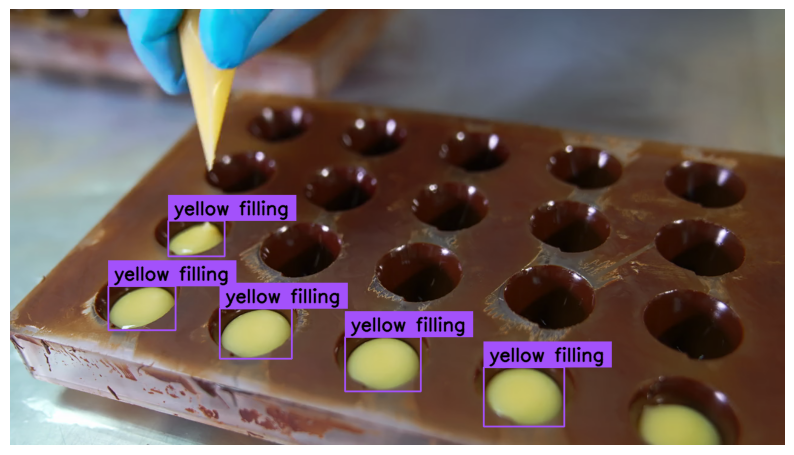
The prompt also finds the large mould, which is not an individual filling. Add a relative-area filter to discard detections larger than 10 percent of the frame.
filtered_pipeline = Pipeline(
    [
        Store("source_frame"),
        RoboflowInference(model, text=["yellow filling"], confidence=0.002),
        Detections.FromInference(),
        Detections.NMS(threshold=0.1),
        Detections.Filter(
            lambda detections: detections.area <= 0.10 * frame_shape[0] * frame_shape[1]
        ),
        Recall("source_frame", prepend=True),
        BoxAnnotator(thickness=2),
        LabelAnnotator(show_class=True, show_confidence=True),
        Pick(0),
    ],
    auto_validate=True,
)
Process Video
Apply the final frame pipeline to every video frame. ImageWindow updates the live display while process_video writes each returned frame to the target video.
from ml_pipes.supervision import ImageWindow

frame_pipeline = Pipeline(
    [
        Store("source_frame"),
        RoboflowInference(model, text=["yellow filling"], confidence=0.002),
        Detections.FromInference(),
        Detections.NMS(threshold=0.1),
        Detections.Filter(
            lambda detections: detections.area
            <= 0.10 * frame_shape[0] * frame_shape[1]
        ),
        Recall("source_frame", prepend=True),
        BoxAnnotator(thickness=2),
        LabelAnnotator(text_color=sv.Color.BLACK),
        ImageWindow("YOLO-World Zero-Shot Detection", at=0),
        Pick(0),
    ],
    auto_validate=True,
)

sv.process_video(
    source_path=source_path,
    target_path="yellow-filling-output.mp4",
    callback=lambda frame, _: frame_pipeline(frame),
)
Inspect the Pipeline
Use Pipeline.inspect() to capture the value at every operator boundary
without changing the pipeline's final output. The inspection renderer turns
that captured run into a shareable HTML report.
from ml_pipes.inspection import PipelineInspector

inspection = frame_pipeline.inspect(representative_frame)
PipelineInspector().save(inspection, "inspection.html")
The report below captures the complete YOLO-World pipeline on a representative video frame.
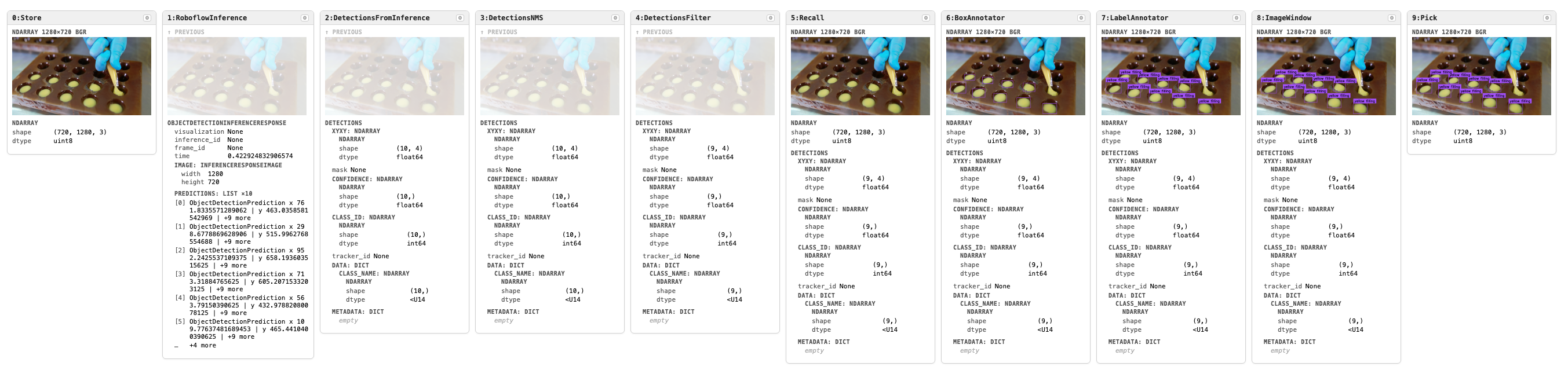
Click the image to open the interactive inspection report.