Time in Zone
Time in zone measures how long each tracked object remains inside a region of interest. It is useful for queue monitoring, retail dwell-time analysis, and restricted-area alerts. This tutorial detects and tracks people, filters those inside a central zone, and annotates each person with their continuous time in that zone.
Download the public video used throughout the tutorial:
from supervision.assets import VideoAssets, download_assets

video_path = download_assets(VideoAssets.PEOPLE_WALKING)
Run Detection and Tracking
RoboflowInference runs a detector on each frame. Convert its result to
Supervision Detections, then pass the detections through ByteTrack so the
same person receives a stable tracker ID across frames.
import supervision as sv

from ml_pipes.core import Pipeline
from ml_pipes.standard import Select, Store
from ml_pipes.supervision import Detections
from ml_pipes.supervision.inference import RoboflowInference
from ml_pipes.supervision.trackers import ByteTrack

pipeline = Pipeline(
    [
        Store("source_frame"),
        RoboflowInference(model_id="yolov8n-640"),
        Select(0),
        Detections.FromInference(),
        ByteTrack(),
    ],
    auto_validate=True,
)
ByteTrack can emit a negative ID while a detection has not yet been
confirmed. The timer treats those transient detections as untracked and assigns
them a duration of zero.
Zone Filtering
Define a polygon in the video coordinate system, then use TriggerZone to
keep only tracked detections inside it. TrackingTimer measures the time in
whatever detection stream reaches it, so placing it after TriggerZone makes
the value specifically time in this zone. It uses the source video's frame
rate to convert elapsed frames into seconds.
import numpy as np

from ml_pipes.supervision import TrackingTimer, TriggerZone

video_info = sv.VideoInfo.from_video_path(video_path)

polygon = np.array(
    [
        [0.2 * video_info.width, 0.2 * video_info.height],
        [0.8 * video_info.width, 0.2 * video_info.height],
        [0.8 * video_info.width, 0.8 * video_info.height],
        [0.2 * video_info.width, 0.8 * video_info.height],
    ],
    dtype=np.int64,
)
zone = sv.PolygonZone(polygon=polygon)

pipeline = Pipeline(
    [
        Store("source_frame"),
        RoboflowInference(model_id="yolov8n-640"),
        Select(0),
        Detections.FromInference(),
        ByteTrack(),
        TriggerZone(zone),
        TrackingTimer(video_info.fps, field="time_in_zone"),
    ],
    auto_validate=True,
)
By default, TrackingTimer starts a new duration if a track is absent from a
frame. Pass reset_missing_tracks=False when a reappearing track should keep
its original entry time. Because the zone filter is a separate operator, you
can swap in another filter, combine multiple zones, or time all tracked
detections without changing the timer itself.
Annotating
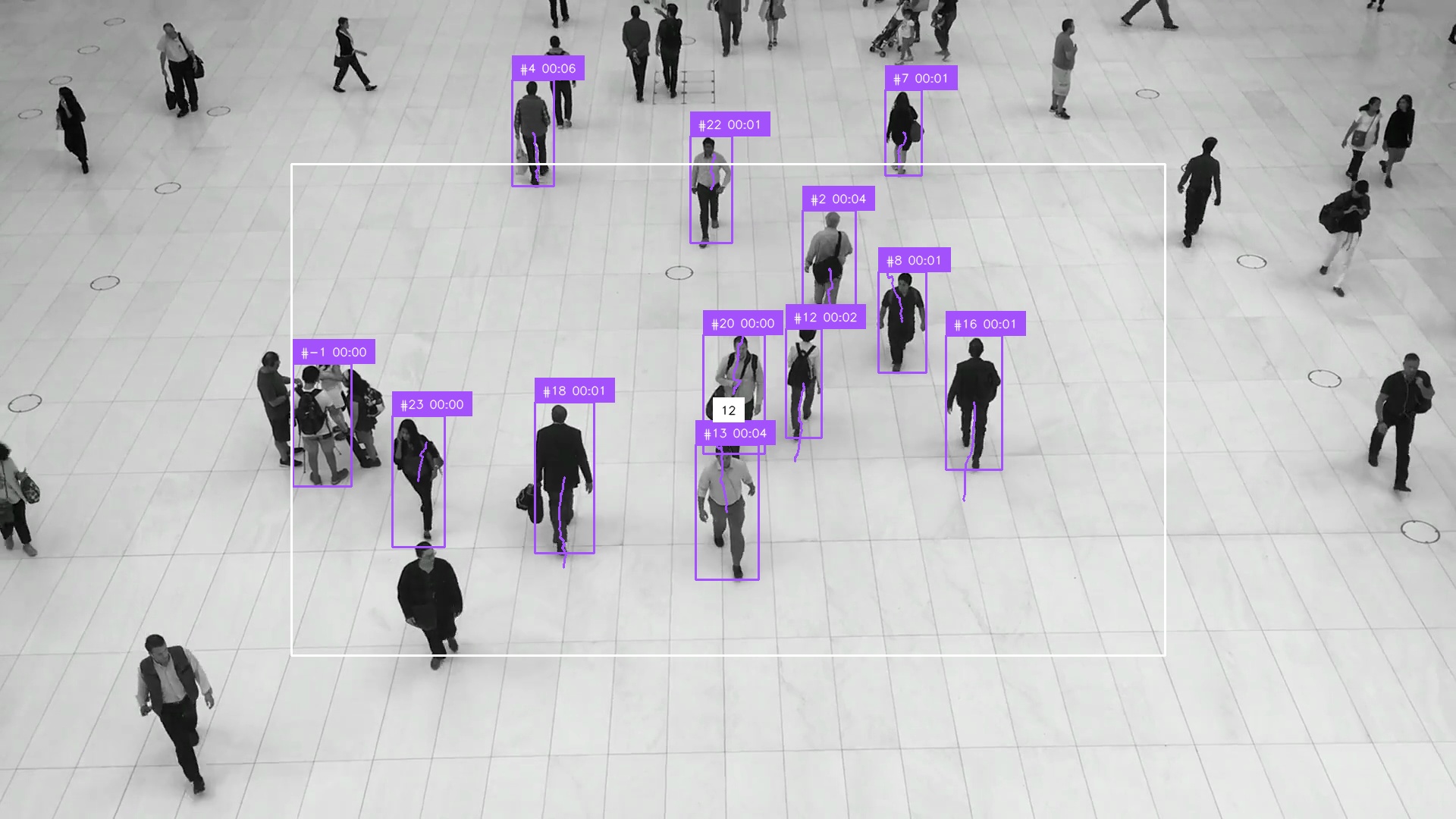
LabelAnnotator can create labels from each detection. Here the label combines
the tracker ID with the time_in_zone field created by the timer.
BoxAnnotator, TraceAnnotator, and PolygonZoneAnnotator add the remaining
visual context.
from ml_pipes.standard import Pick, Recall
from ml_pipes.supervision import (
    BoxAnnotator,
    LabelAnnotator,
    PolygonZoneAnnotator,
    TraceAnnotator,
)


pipeline = Pipeline(
    [
        Store("source_frame"),
        RoboflowInference(model_id="yolov8n-640"),
        Select(0),
        Detections.FromInference(),
        ByteTrack(),
        TriggerZone(zone),
        TrackingTimer(video_info.fps, field="time_in_zone"),
        Recall("source_frame", prepend=True),
        TraceAnnotator(),
        BoxAnnotator(),
        LabelAnnotator(
            label_formatter=lambda detection: (
                f"#{int(detection.tracker_id) if detection.tracker_id is not None else -1} "
                f"{int(float(detection.data['time_in_zone'])) // 60:02d}:"
                f"{int(float(detection.data['time_in_zone'])) % 60:02d}"
            )
        ),
        PolygonZoneAnnotator(zone=zone),
        Pick(0),
    ],
    auto_validate=True,
)
Run the Pipeline
The annotation step completes the pipeline. Recall brings back the original
frame after the detection stream has been filtered and timed; the annotators
then receive the (frame, detections) pair they need. Pick(0) returns only
the annotated frame, which makes pipeline directly usable with
sv.process_video.
sv.process_video(
    source_path=video_path,
    target_path="time-in-zone-result.mp4",
    callback=lambda frame, _: pipeline(frame),
)
This frame was captured 6.8 seconds into the video, rather than from its first frame, so the labels show elapsed time in the zone.
The complete runnable version is available at
examples/run_time_in_zone.py.
Pipeline Inspection
Inspecting the first frame correctly shows zero durations, but does not show
the useful state accumulated by a timer. Warm the stateful pipeline through the
first half of the video, then inspect the next, representative frame. Calling
inspect records every operator boundary without changing the pipeline's
output.
from ml_pipes.inspection import PipelineInspector

frames = iter(sv.get_video_frames_generator(video_path))
for _ in range(video_info.total_frames // 2):
    pipeline(next(frames))

middle_frame = next(frames)
inspection = pipeline.inspect(middle_frame)
PipelineInspector().save(inspection, "inspection.html")
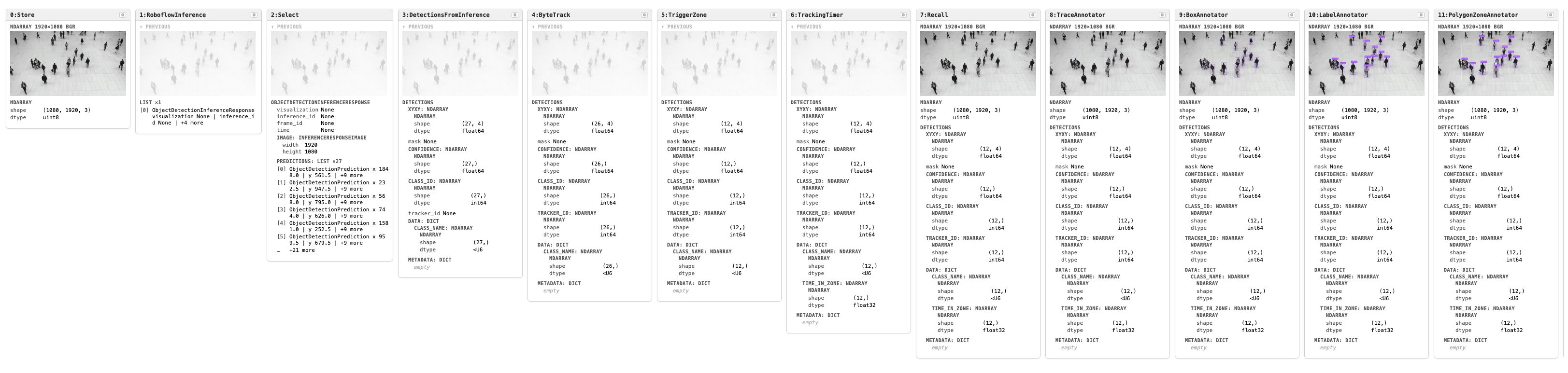
Click the image to open the interactive inspection report.